Ecommerce SEO — How Online Stores Get Found on Google
Ecommerce SEO is how an online store gets found by people who are already searching for what it sells. Not followers, not ad clicks you pay for every single time. Shoppers typing "best whey protein isolate" or "linen duvet cover queen" into Google with a card in reach. Most stores get very little of that traffic, and it's rarely because the products are worse. It's because the pages were never built to rank. That's the part of SEO we spend most of our time on for online stores, and this guide walks through it in priority order.
If you're still picking a platform, our comparison of Shopify vs WooCommerce covers that decision. Short version: either one can rank. And if you're brand new to search, start with SEO for small business and come back. This post assumes you've got a store and want it to stop depending on ads.
What Makes Ecommerce SEO Different
A service business has a handful of pages to rank. A store has dozens or hundreds, and most of them look alike. That creates three problems a normal site never has:
- Scale. Every product, category and filter combination is a page. Fixing them one at a time doesn't work. You fix the template.
- Thin, duplicate copy. Most stores paste in the manufacturer's description, which is the same text on every other site selling that product. Google has no reason to pick yours.
- Pages that come and go. Products sell out, get discontinued and come back. Handled badly, that leaves a trail of dead links and lost rankings.
The upside: once the templates are right, every new product you add starts life already set up to rank.
Start With the Keywords Buyers Actually Use
Store searches fall into three buckets, and each one belongs on a different kind of page:
- Category searches like "women's trail running shoes." Big volume, still deciding. These belong on collection pages.
- Product searches like a brand plus model name. Small volume, ready to buy. These belong on product pages.
- Question searches like "how much protein do I need a day." Earlier in the journey. These belong in blog content that points to the right collection.
The common mistake is trying to rank the homepage for everything. Map each term to one page, and make sure no two pages chase the same one. Our guide to keyword research covers how to find the terms and how to tell the ones with buyers behind them from the ones that just look busy.
Collection Pages Are Your Biggest Opportunity
Most stores treat category pages as a product grid with a title on top. That's a missed opportunity, because collection pages are what rank for the category searches with the most volume. A grid of 12 product thumbnails gives Google almost nothing to work with.
What a collection page that ranks actually has:
- A short intro above the grid that uses the category term naturally and tells a shopper what's in it.
- A buying guide or "how to choose" section below the grid, answering the questions people ask before they pick.
- A handful of FAQs, and links to related collections and helpful blog posts.
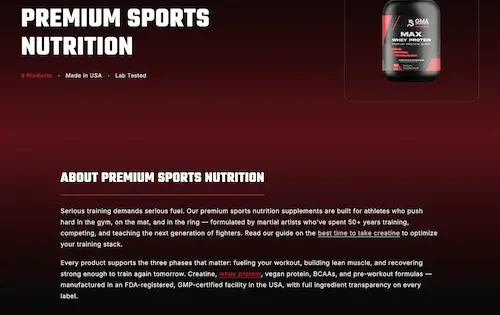
That's the approach we took with GMA Warrior Supplements. Their old store had bare product grids for category pages. The rebuild gave each of 8+ collections real copy around what buyers search, a how-to-choose guide and FAQs, then linked it all to product pages built the same way.
Product Pages That Rank and Sell
Product pages close the sale, so they have two jobs: rank for the specific searches and convince the shopper once they land. The basics that cover both:
- Write your own description. Lead with the benefit, then the details a buyer checks before spending: sizing, materials, ingredients, what's in the box. Rewrite manufacturer copy, starting with your best sellers.
- Use clear titles. Product name plus the term people search, like "Organic Cotton Crew Tee — Men's," not an internal SKU name.
- Show real photos with alt text. Multiple angles, scale and the product in use. Describe each image in the alt text so search engines and screen readers know what it shows.
- Add reviews and Product schema. Structured data for price, availability and ratings can make your listing eligible for richer results on Google.
The ranking only pays if the page converts once someone lands, which is where conversion rate optimization picks up. The two are the same project on a product page.

The Technical Traps That Hit Stores Hardest
Online stores break more technical SEO rules by accident than any other kind of site. Three to check first:
Filters and sort orders. Every time a shopper filters by color, size or price, most platforms create a new URL. Google's own documentation warns that this kind of faceted navigation can generate infinite URL spaces, which means Google burns its time crawling endless filter combinations instead of your real products. Unless a filtered page targets a real search, keep it out of the crawl and point canonicals at the main collection.
Variants and duplicates. The same product reachable at three URLs, or a page per color with identical copy, splits your ranking signals. Pick one canonical URL per product. The duplicate-URL section of our guide to technical SEO covers the fix in detail.
Out-of-stock and discontinued products. If it's coming back, keep the page live and say so. If it's gone for good, 301-redirect it to the closest replacement or its collection. Don't let it turn into a 404 that throws away the rankings it earned.
Most store traffic also lands on a phone, so site speed matters more here than almost anywhere. Heavy product images are usually the main culprit.

Content That Brings Buyers In
Question searches happen before someone's ready to buy, and they're where a store can win traffic its competitors ignore. A post that answers "when's the best time to take creatine?" well, then links to the right collection, catches the buyer early and walks them to the product.
That's content marketing for a store. It's not a lifestyle blog. Every post should answer a real pre-purchase question and point somewhere that sells. The GMA Warrior Supplements build ran on that exact model: a blog built around the questions buyers ask, each post routing readers to a collection or product.
How to Know It's Working
Ecommerce SEO is slower than ads up front, so you need the right numbers to know whether it's moving. Watch these monthly:
- Search Console by page type. Impressions and clicks for collection pages, product pages and blog posts. Collections usually move first.
- Indexed pages. If the count is far above your real product and collection total, filter URLs are leaking into the index.
- Organic revenue. Orders and revenue from organic search in your analytics, not just traffic. Traffic that doesn't buy is a keyword problem.
Once a quarter, run a proper SEO audit to catch template problems before they spread across every product.
Where to Start
If you're doing nothing yet, go in this order: fix the filter and duplicate-URL problems, put real copy on your top five collections, then rewrite descriptions for your ten best sellers. That alone puts you ahead of most stores in your category. Add one helpful post a month after that.
If you'd rather hand the whole thing off, that's what our web design and SEO team builds: stores that rank from the template up. The work we've done shows what that looks like in practice.
Frequently Asked Questions
Is your store getting found, or just paying for clicks?
Book a free 30-minute call. We'll look at your collection pages, product pages and the technical setup behind them, and tell you what's holding your rankings back and what to fix first.
Book a Free SEO Audit