Technical SEO Explained — The 10 Things That Actually Matter
Technical SEO is the part of SEO nobody sells you on, because there's nothing to show. You can photograph a new website. You can't photograph a canonical tag. So it gets skipped, and then a business spends eighteen months writing content that Google either can't reach, can't tell apart, or won't wait around to load.
The good news is that the list is shorter than the industry pretends. There are maybe ten things that genuinely matter for a small-business site, most sites get seven of them right by accident, and the two or three that are broken are usually broken badly enough to explain the whole problem. Here they are, in the order we'd check them — a layer underneath the fundamentals in our SEO for small business guide.
What Technical SEO Actually Is
Three things decide how you rank. Content decides what you rank for. Links and local signals decide how much authority you carry. Technical SEO decides whether either of those gets counted at all.
Think of it as the difference between your inventory and your front door. The best products on the street do no work if the door sticks and the sign points at the wrong building. Technical SEO is the door and the sign — which is why it's inseparable from web design. Almost every problem below was created by a build decision, not a marketing one.
Layer One: Can Google Get In?
Nothing else on this list matters until these three are true. They're also where the catastrophic, silent failures live.
1. Crawlability — what your robots.txt is actually doing
Your site has a file at yoursite.com/robots.txt that tells crawlers where they may and may not go. Go and read yours right now. It takes ten seconds, and roughly once a quarter we open one that's still blocking the entire site from a staging build that went live eight months ago.
One correction worth internalizing, because it's the single most common misunderstanding in this whole subject. Blocking a page in robots.txt does not remove it from Google. As Google's own documentation puts it, robots.txt "is not a mechanism for keeping a web page out of Google" — to do that you need a noindex tag or a password. Block a page in robots.txt and you've told Google not to read it, not to forget it. It can still show up in results, now with nothing useful to display.

2. Indexing — is the page actually in there?
Crawled and indexed aren't the same thing — Google can visit a page and decide not to keep it. The check is free: open Search Console, go to the Pages report, and read what's excluded and why. "Crawled — currently not indexed" usually means thin content. "Excluded by 'noindex' tag" means somebody left a switch flipped, and on WordPress that switch is often the "Discourage search engines" checkbox from the day the site was built.
If a page isn't indexed, it cannot rank. Not "ranks poorly" — cannot rank. This is the first thing to rule out whenever a page that should be performing simply isn't.
3. One URL per page
Your homepage can be reached at four addresses without you doing anything: with and without www, over http and https. Add a trailing slash and a couple of tracking parameters and one page has eight versions. Google has to work out which is real, and the authority you've earned gets split between the copies.
The fix is boring and permanent: pick one canonical version, 301-redirect the rest to it, and put a self-referencing canonical tag on every page. Ecommerce sites need to be strictest here, because filters and sort orders spawn near-infinite variants of the same products. Our guide to ecommerce SEO covers how stores keep them under control.
Layer Two: Can Google Use What It Finds?
4. Speed — measured the way Google measures it
Google reads real-world loading performance through Core Web Vitals and uses it as a ranking input. It's a tiebreaker, not a headline factor — a fast page about the wrong topic still won't rank — but between two comparable competitors it decides. The mistake is measuring on office wifi on a desktop. Run PageSpeed Insights and read the mobile tab, which is how your customers actually arrive. We covered the fixes in how to make your website faster; the short version is that oversized images and a stack of plugins account for most of it.
5. Mobile is the version that gets judged
Google indexes the mobile version of your site. Not the desktop one. If your mobile layout hides content in collapsed sections that never load, drops the internal links your desktop nav carries, or serves smaller images with different alt text, then the version Google is grading is the reduced one — and the desktop site you're proud of is largely irrelevant to your rankings.
Check this the low-tech way. Open your own site on your phone, on cellular data, and try to complete the thing a customer would want to do. Most technical problems that matter are visible in ninety seconds of that.

6. HTTPS, all the way through
The certificate itself is table stakes now, and almost everyone has one. What people miss is mixed content: a secure page that loads an image, script or font over plain http. Browsers flag it, some assets get blocked outright, and the padlock your customers look for quietly disappears on exactly the pages where it matters most, like checkout and contact forms.
Layer Three: Can Google Make Sense of the Whole Site?
7. A structure that's three clicks deep, not thirty
Every important page should be reachable from your homepage in about three clicks. Pages buried deeper get crawled less often and inherit less authority — and pages with no internal links pointing at them at all are effectively invisible, no matter how good they are.
This is also where a lot of sites quietly compete with themselves. Two pages targeting the same phrase split the rankings between them instead of one page winning. Sort that out at the keyword research stage — one page, one job, one primary term — rather than discovering it a year in.
8. A sitemap that tells the truth
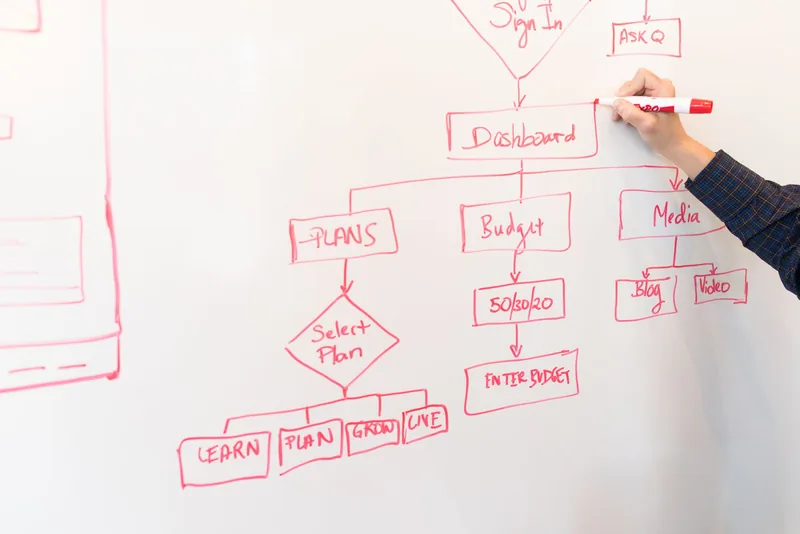
An XML sitemap is a list of the URLs you want indexed, submitted to Search Console. The value isn't the file — it's the accuracy. A sitemap listing pages that 404, redirect or carry a noindex tag is worse than no sitemap, because you're handing Google a map to nowhere.
Submit it once, then actually read the report it generates. Search Console is the only place you see your site the way Google sees it, and it's free — which makes it the foundation of any honest marketing analytics setup, not an optional extra.
9. Structured data
Structured data is markup that states plainly what a page is: a business, a product, an article, an FAQ. It doesn't boost rankings directly — it makes you eligible for the rich results, like star ratings, prices, opening hours and FAQ dropdowns, that take up more room on the results page and pull more clicks at the same position.
For a local business, LocalBusiness markup with your name, address, phone and hours is the one to get right first, because it feeds the same signals that decide local SEO. One rule: the markup has to match what's visible on the page. Marking up reviews you don't display is a manual-action risk, not a shortcut.
10. Dead ends and detours
Broken internal links waste crawls and irritate customers. Redirect chains — page A sends you to B, which sends you to C — leak a little authority at every hop and slow the page down. Both accumulate silently after every redesign, and both are cheap to fix once you can see them. Crawl your own site with any free crawler twice a year and you'll catch them before they compound.
What This Looks Like When It's Done
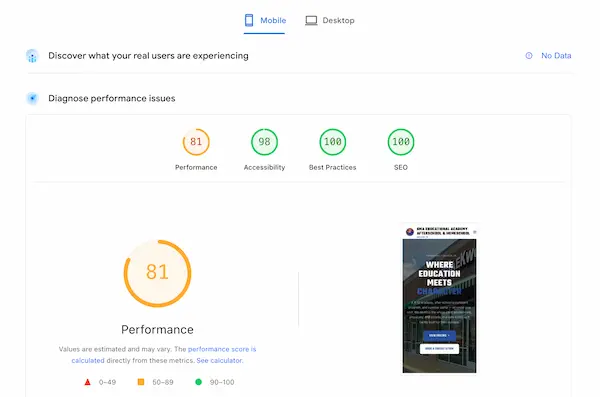
A concrete example rather than a hypothetical. GMA After School & Homeschool is a K–12 after-school program in Gallatin, TN that came to us running a free template — no real structure, and nothing on the page for Google to work with. After the rebuild, the site scores 100/100 on Lighthouse's SEO audit with mobile performance up from 68 to 81.
Now the honest caveat, because it's the part most agencies leave out. A 100 on that audit is a floor, not a result. It means the page is machine-readable — titles present, headings sane, crawlable links, valid meta — and says nothing about whether anybody is searching for you. That build worked because the technical pass was paired with real program pages and a blog aimed at the questions local parents actually type. Technical SEO earned the right to compete. Content did the competing.
What Technical SEO Can't Do
It won't make you rank for something nobody searches. It won't rescue a page with nothing on it. It won't beat a competitor with ten years of reputation and a hundred times your link profile on a head term. And it isn't an ongoing monthly deliverable for most small businesses — it's a project, followed by maintenance.
That last point is worth holding onto when you're choosing an SEO company. If a proposal is heavy on recurring "technical optimization" and light on content and local signals, ask what specifically is being optimized every month. On a healthy twelve-page site, the honest answer is usually "not much."
Where to Start
In order, because the order matters more than the effort:
- Read your robots.txt. Ten seconds. Catches the worst possible failure.
- Open Search Console and read the Pages report. Anything important sitting in "excluded" is your first job.
- Run PageSpeed Insights on mobile for your homepage and your best money page.
- Load your own site on your phone on cellular and try to buy or book something.
- Then fix the duplicates — one canonical URL per page, 301s for the rest.
That's an afternoon, it's free, and it tells you whether you have a technical problem or a content problem. Those need different budgets, and guessing wrong is how a year gets wasted. If you'd rather hand the pass over, the work we've done is an honest sample of how we run it.
Frequently Asked Questions
Not sure if it's a technical problem or a content problem?
Book a free 30-minute call. We'll check whether Google can actually crawl and index your site, run your key pages on mobile, and tell you which of the ten above is costing you the most — no pitch deck, just a real conversation.
Book a Free SEO Call