How to Make Your Website Faster — And Why Slow Pages Cost You Customers
Website speed optimization is the least glamorous work in marketing and one of the few things that improves every single number on your dashboard at once. It doesn't need a new brand, a new offer, or a bigger budget. It's the same site you already have, showing up before the visitor gives up on it. That's why it's the first thing we check in almost every web design engagement, ahead of anything cosmetic.
The reason it matters so much is that speed sits underneath everything else. You can win the search result, write the perfect headline, and pay for the click — and none of it counts if the page is still blank three seconds later. Every other fix in our guide to a website that actually converts assumes the visitor stuck around long enough to see it.
What "Slow" Actually Costs You
Two things, and the second one is bigger than most owners expect.
The first is rankings. Google measures real-world loading experience through Core Web Vitals and uses it as a ranking signal. It's a tiebreaker rather than a headline factor — a fast page about the wrong topic still won't rank — but when you and a competitor are otherwise evenly matched, it decides. That makes it part of the same job as your SEO, not a separate technical errand — speed is one of the ten items in our guide to technical SEO.
The second is everything you already paid to get. A visitor who taps your listing from the map pack, waits, and backs out is a lead you earned and then lost at the door. All the work in Google Business Profile optimization ends on your website, and so does every click from paid ads — where you're literally paying per visitor for the privilege of losing them to a loading spinner. Slow pages don't just underperform; they quietly tax every channel feeding them.

Measure Before You Change Anything
Five minutes, one free tool. Run your homepage and your most important service page through Google's PageSpeed Insights, and read the mobile tab — not desktop. Desktop scores flatter you. Mobile on a normal cell connection is how most of your customers actually arrive.
You'll get a score out of 100 and three numbers underneath it. Those three are what matter:
- LCP (Largest Contentful Paint) — how long until the main thing on the page appears. Under 2.5 seconds is the target. This is the one that's usually broken.
- INP (Interaction to Next Paint) — how quickly the page responds when someone taps something. Under 200 milliseconds.
- CLS (Cumulative Layout Shift) — how much the page jumps around while it loads. Under 0.1. This is why people accidentally tap the wrong button.
Write down today's numbers before you touch anything. Speed work is easy to do and easy to imagine you've done, and without a baseline you'll never know which change actually helped.

The Five Things Actually Slowing You Down
In our experience the same handful of culprits account for nearly every slow small-business site, roughly in this order.
1. Images — almost always the biggest one
Someone uploaded a 4 MB photo straight off a phone or a camera and the browser is now downloading a print-resolution file to display it 800 pixels wide. Fix it in three moves: resize images to the size they're actually shown at, save them as WebP instead of JPEG or PNG, and add lazy loading so images below the fold don't load until someone scrolls to them. On a photo-heavy site this alone can halve the load time.
2. Plugins and third-party scripts
Every plugin adds code to your pages, and most of them load on every page whether that page uses them or not. Same story for the tags that accumulate over the years — chat widgets, heatmaps, two analytics tools, an abandoned ad pixel. Audit the list, delete anything you can't name a reason for, and keep the rest. This is also where the platform decision shows up: our breakdown of WordPress vs custom-coded covers why plugin sprawl is a WordPress-shaped problem in particular.
3. Cheap hosting
The $3-a-month plan puts your site on a server with hundreds of others, and their traffic spikes become your slow afternoons. Server response time — how long before the page even starts arriving — should be under about 200 milliseconds. If PageSpeed flags it, no amount of image compression will save you. Moving to decent hosting costs a few dollars more a month and is the rare fix that takes an hour and helps every page at once.
4. Fonts and render-blocking code
Four font weights from three families is four extra downloads before any text appears. Cut to one or two families and only the weights you actually use. Then let CSS and JavaScript that isn't needed for the first screen load after it, rather than blocking the page while it downloads.
5. No caching or CDN
Caching serves a pre-built copy of the page so your server isn't rebuilding it for every visitor. A CDN keeps copies of your files on servers near your customers instead of wherever your host lives. Both are close to free, both are on by default at any competent host, and together they're the cheapest win on this list — just don't mistake them for a fix. Caching a bloated page makes a bloated page arrive slightly sooner.
What a Real Before-and-After Looks Like
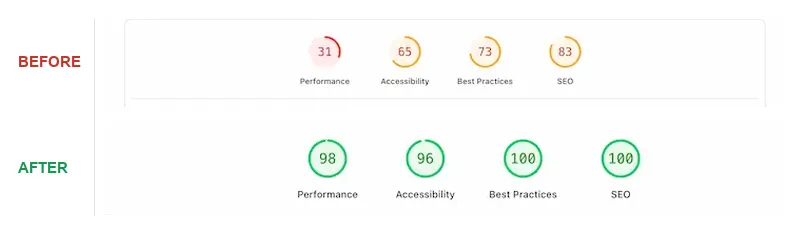
When Global Martial Arts USA came to us, their site scored 31 out of 100 for mobile performance — deep in Google's red band, and the practical meaning of that is most visitors never saw the page at all. A 50-year-old school with a genuinely great reputation was losing parents at the loading screen.
Being straight about what fixed it: this wasn't a plugin and an afternoon. The site had enough problems — thin content, no booking path, buried phone numbers — that we rebuilt it rather than patched it, and the performance score came along with the rebuild. It finished at 98 on mobile, with SEO going from 83 to 100.
When Speed Work Means a Rebuild
Most sites don't need that. Compress the images, cut the dead plugins, turn on caching, and a failing site usually lands in passing territory for the cost of an afternoon.
The exception is when the slowness is structural — a page-builder theme that ships 2 MB of CSS before your content, a platform you've outgrown, or a site where every fix breaks something else. At that point you're maintaining the problem. Speed on its own is rarely reason enough to start over, but it's rarely the only complaint either; the other website redesign signals are worth reading honestly before you decide. If the answer is yes, how much a website costs lays out the real 2026 numbers so you can scope it properly.
Keep It Fast
Sites get slow the same way garages get full — gradually, one reasonable-seeming addition at a time. A new plugin here, an uncompressed hero image there, a tracking script someone asked for two years ago and nobody removed.
So make it a habit rather than a project. Re-test the same two pages once a month and compare against the baseline you wrote down. Resize every image before it goes up. Before installing anything, ask what it costs in load time. And connect the speed numbers to the business ones — bounce rate, conversions, revenue per session — which is exactly what our marketing analytics work is for. Fast is a maintained state, not a finished task. If you'd rather hand that off, the work we've done is the honest sample of how we approach it.
Frequently Asked Questions
Want to know what's actually slowing your site down?
Book a free 30-minute call. We'll run your site live, walk through what's costing you seconds, and tell you what's worth fixing and what isn't — no pitch deck, just a real conversation.
Book a Free Site Speed Review