AI Chatbots for Your Website — Do They Actually Convert?
An AI chatbot for your website is either the best hire you never made or the most annoying thing on the page. The difference has very little to do with the AI. It comes down to what the bot knows, what it's trying to get the visitor to do, and what happens after it hands the lead off. We build these as part of our AI and automation work, and we've seen both versions.
So, do they convert? Yes, when they're set up to answer the question that's stopping someone from booking. Here's how to tell whether your site needs one, what a good one looks like, and how to set it up so it actually brings in leads. It's one piece of a bigger AI lead generation setup, and probably the most visible one.
What a Modern Website Chatbot Actually Does
The old chat widgets were decision trees. Pick from four buttons, get a canned answer, then hit a dead end and a "leave your email" box. Most people closed them.
An AI chatbot reads what the visitor actually typed and answers in plain language, using information you give it: your services, prices, hours, location, policies and the questions your front desk answers ten times a day. A good one does three jobs:
- Answers the question. "Do you take walk-ins?" "How much is a first visit?" "Is there parking?"
- Moves the visitor to the next step. A booking link, a free-trial form or a callback request. This is the step that turns a chat into a lead.
- Hands off what it shouldn't handle. Custom quotes, complaints, billing problems. Those go to a person with the conversation attached.
If a chatbot only does the first job, it's a fancy FAQ page. The second job is where the conversions come from.
When a Chatbot Converts and When It Doesn't
A chatbot earns its spot when a few things are true:
- Visitors have questions before they book. Classes, appointments, services with options or pricing that depends on something. If people need an answer before they commit, the bot can give it at the exact moment they're deciding.
- A lot of your traffic arrives after hours. Evenings and weekends are when many people finally get around to looking. A form gets a reply tomorrow. A bot answers now.
- Your team answers the same questions all day. If the phone and inbox are full of "what time is the 6 p.m. class," that's a knowledge base waiting to be written.
It won't help much when the site barely gets traffic, when every job needs a custom quote, or when the page underneath is slow and confusing. A chatbot on a broken site is a patch, not a fix. If people are leaving before they'd ever open a chat, start with conversion rate optimization instead.

What a Good One Looks Like
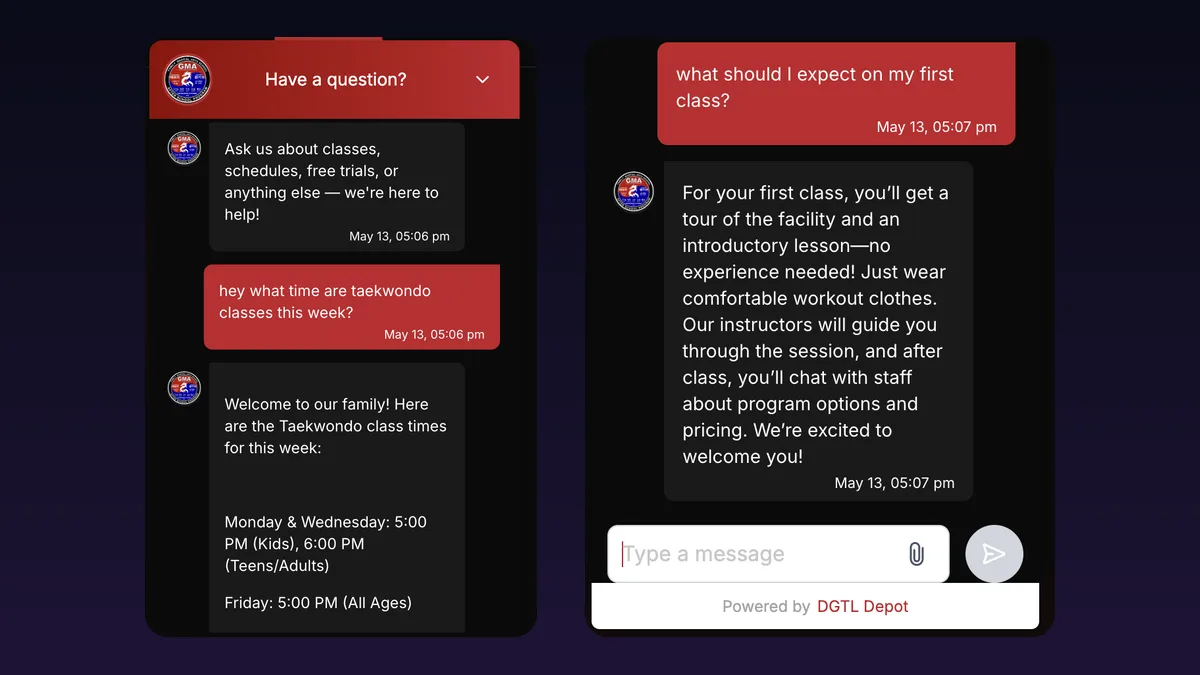
Here's a real one. For Global Martial Arts USA, a martial arts school in Gallatin, Tennessee, we built a chat assistant trained on the school's classes, pricing, schedules and policies. Parents ask it what time Taekwondo runs this week, what to wear to a first class or whether a program is right for their kid, and it answers in seconds. Serious inquiries get sent straight to the free-trial booking flow.
Just as important is what it doesn't do. Schedule changes, billing issues and custom requests get handed to the school with the conversation already captured, so nobody has to ask the parent to repeat themselves. That frees up the front desk to look after the people who are actually in the building.
The Bot Speaks for You
Here's the part most chatbot sales pages skip. Whatever your chatbot tells a customer, your business said it.
In 2024, a Canadian tribunal ruled against Air Canada after its website chatbot told a grieving customer he could apply for a bereavement fare after booking, which contradicted the airline's own policy. Air Canada argued the chatbot was responsible for its own words. The tribunal didn't buy it: "While a chatbot has an interactive component, it is still just a part of Air Canada's website" (McCarthy Tétrault's summary of the case). The airline had to pay the difference.
The dollar amount was small. The lesson isn't. Don't let the bot guess. Keep it to information you've written and checked, have it say "let me get someone for you" when it doesn't know, and keep anything with legal or money consequences, like refunds and custom pricing, with a person.
How to Set One Up So It Converts
1. Write the knowledge base first. Before you pick any software, write down your services, prices (or price ranges you're comfortable publishing), hours, location, policies and the 20 questions your team hears most, with the answers you'd actually give. This document matters more than which AI model sits behind the widget.

2. Pick one goal. A booked appointment, a free-trial signup or a callback request. The bot should steer every useful conversation toward it, the same way a good salesperson would. That's the difference between a chatbot and a chatbot that does lead generation.
3. Answer first, ask for contact info second. A widget that demands a name and email before it will say anything gets closed. Answer the question, then offer the next step. "Want me to save you a spot? What's the best number to text?" feels like service, not a gate.
4. Make the handoff obvious. A clear "talk to a person" option, plus rules for when the bot steps aside on its own. Then make sure a person actually follows up.
5. Wire it into your CRM. Every chat lead should land in the same place as your form and phone leads, tagged as coming from chat, and kick off the same follow-up. A lead captured at 11 p.m. that nobody sees until Thursday is a lead lost. This is where the chatbot meets your email, SMS and CRM automation.
6. Keep it light. Chat widgets run their own scripts, and a heavy one slows the page it's supposed to help. Load it after the main content and check your speed before and after it goes live. Our guide on how to make your website faster covers what to look for.
7. Write a real opening line. "Hi! How can I help?" is easy to ignore. Something specific to the page converts better: "Questions about the free trial? Ask me anything." On a pricing page, lead with pricing.
What to Measure
Don't judge a chatbot on how many chats it starts. Track these instead:
- Leads captured from chat: contacts collected, tagged by source in your CRM.
- Bookings from chat: how many of those leads actually booked or bought. This is the number that matters.
- After-hours share: how many chat leads came in while you were closed. These are leads a form alone would probably have missed or answered too late.
- Handoff rate and wrong answers: read a sample of transcripts every week. Every question it fumbled is a line to add to the knowledge base.
Set up properly, chat leads show up in the same reports as every other lead source, so you can compare them fairly. That's the kind of tracking our marketing analytics work puts in place. If the numbers don't move after a month or two, the bot usually isn't the problem. Look at the offer, the follow-up or the page it sits on.
Where to Start
Start with the knowledge base, even before you decide on a chatbot. It's useful on its own as a better FAQ page and a cheat sheet for your staff. Then put the bot on your highest-traffic page first, usually the homepage or pricing page, with one goal and a clear handoff. Read the transcripts for a few weeks and add to it. If you're still deciding where AI fits in your business at all, our overview of AI for small business is a good place to start, and our post on what an AI automation agency actually does explains what it looks like to have someone build this for you.
If you'd rather have it built and trained for you, that's what we do. The work we've done shows how we approach builds like this.
Frequently Asked Questions
Want a chatbot that actually books leads?
Book a free 30-minute call. We'll look at your site, where your leads come from and what your visitors ask, and tell you straight whether a chatbot would pay off for you.
Book a Free AI Automation Call